User accounts vs membership records
Last updated 15 September 2026
Your user account and your membership record are two different things. Most of the time you never need to think about that — until the site tells you they aren't associated with each other.
What each one is
A user account is what you use to login to this website: an email address, a password, and the permissions you hold. You create and control it yourself (see Register).
A membership record is your entry in the Gliding New Zealand membership database: your GNZ number, your clubs, your ratings, your medical, and your flying history. It's maintained by your club, and it exists whether or not you ever sign in here.
Why they're separate
People join a gliding club long before they use this website, and plenty of members never use it at all — so every member has a record, but not every member has an account. It happens the other way round too: a friend of the club, a contest scorer, or a visiting pilot can hold an account without being a GNZ member.
Keeping them apart also means your club administrator can correct your ratings or your address without touching your password, and you can change your password without anyone editing the membership database.
How they get connected
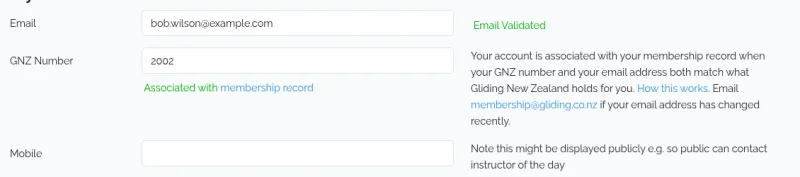
Your account is associated with your membership record when both of these are true:
- The GNZ Number on your account matches the GNZ number on a membership record.
- The email address on your account is the same as the email address on that membership record.
Both have to be right. The GNZ number alone isn't enough — the matching email address is what shows the account belongs to you, and not to someone who happens to know your number. Capitalisation and stray spaces don't matter; the addresses themselves must be the same.
What "not associated" means
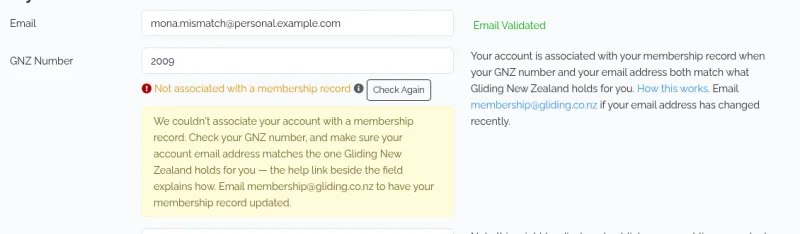
If your account page says Not associated with a membership record, you can still sign in, but the site treats you as a non-member: the membership list, ratings reports, and everything else reserved for GNZ members stay closed to you.
It does not mean your membership has lapsed. It means the site can't yet tell that this account belongs to that member.
If your user account isn't associated
Work through these in order on your account page:
- Check your GNZ number. Make sure it's your own, with no spaces or extra characters.
- Check your email address. It has to be the address your club holds for you. A work address on one and a personal address on the other won't match, and neither will an address you've stopped using.
- Check your email is validated. The match is only tested once your account shows Email Validated. If it doesn't, click Re-send Validation Email and follow the link in the message.
- Click Check Again, next to the GNZ Number field.
If it still doesn't associate, the address Gliding New Zealand holds for you is almost certainly not the one you're signing in with. Either change your account email to the address your club has for you and validate it, or email membership@gliding.co.nz with your name and GNZ number and ask them to update the address on your record.
If something goes wrong
I've changed my email address — Update it on your account page and follow the validation link, then email membership@gliding.co.nz so your membership record is updated too. Changing one doesn't change the other.
I don't know my GNZ number — Ask your club, or email membership@gliding.co.nz.
A member's page says there's no user account — Usually it means they've never registered; plenty of members never do. It can also mean they have an account that isn't associated, for the reasons above.
I'm a national administrator and I've just fixed someone's record — Open their user page under Admin → Users and click Re-check. It re-runs the check there and then, and tells you exactly which two addresses disagree if it still doesn't match. Club administrators can't reach that screen; if you're one, ask the member to click Check Again on their own account page, or email membership@gliding.co.nz.